ARCHIVE SIGNAL General
Soul/ Learned to Hear, See, and Speak
Soul/ can now hear bounded spoken requests, answer in a local voice, and inspect an explicitly provided picture or screen capture without turning perception into ambient surveillance or authority.
Apparently It Needed Ears
The last time I wrote about Soul/, it had accumulated several brains, two creative studios, a taste for nocturnal electronic music, and enough GPU orchestration to make the phrase “just run the model” feel increasingly unhelpful.
It could talk, in the sense that text appeared in a conversation.
It could see, in the sense that Visual Studio could generate an image.
Neither of those things meant it could hear me speak, answer with a voice, or look at the screen in front of me and understand what I was asking about.
Those are very different capabilities.
Soul/ can now accept a bounded spoken request, transcribe it locally, answer through the ordinary conversation system, and speak the response in a local voice. It can remain visibly available for “Hey Soul,” allow a short natural follow-up, inspect a picture I deliberately attach, or capture one exact view of the current screen when I explicitly ask it to look.
That sounds like a fairly ordinary list of assistant features.
The interesting part is everything those features are not allowed to become.
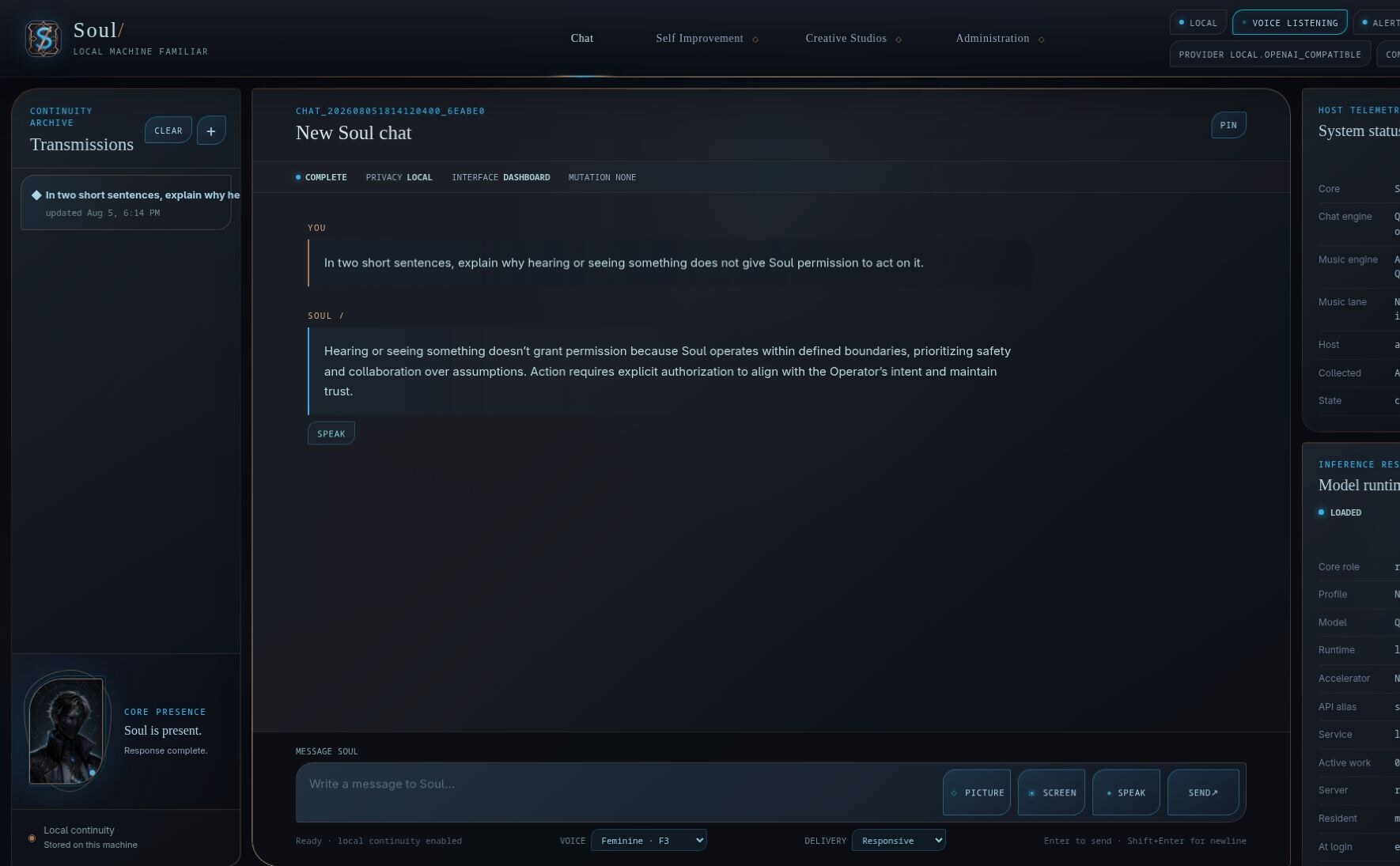
Voice Presence is explicit and visible. The dashboard reports that voice listening is active while Chat, the Soul/ portrait, and the ordinary conversation boundary remain in view. Select any screenshot to open the full-resolution image.
A Microphone Is Not A Permission Slip
Voice began with the least magical version possible: a button.
Inside Chat, I press Speak, say one thing, and press Stop. Capture also stops automatically at sixty seconds. The browser recording is validated, normalized, and transcribed locally through a pinned whisper.cpp runtime. The transcript enters the same Chat path as anything I type.
That last part matters.
There is no separate voice assistant hiding beside Soul/. A spoken message does not bypass the conversation, memory, skill, Core, or approval systems merely because it arrived through a microphone. It becomes one ordinary message with the same rules as every other message.
The source recording is deleted. The normalized audio is deleted. The transcription output is deleted. What remains is the text I submitted and the resulting conversation turn.
If I change conversations, close the page, or log out while recording, the unfinished audio is discarded.
This is not because a few seconds of my voice would be the most sensitive artifact on the machine. It is because keeping it would need a reason.
Soul/ should not gradually assemble an audio archive simply because storage is cheap and microphones are easy to open.
Then It Answered Back
Speech output followed a similar rule: speaking is an action, not a default condition.
An eligible Soul/ response now has an explicit Speak control. Push-to-Talk can also speak the one response produced by that completed voice turn. Ordinary typed conversations do not suddenly begin narrating themselves because someone added a text-to-speech engine.
There are currently two delivery paths.
Responsive speech uses Supertonic on the CPU. It is the faster path and does not need to occupy a GPU. Expressive speech uses Chatterbox when the required NVIDIA resource is safely available, with a guarded CPU fallback when it is not.
Neither engine remains resident after the request.
If a specialist resource is busy, Soul/ does not interrupt the work already using it so the answer can sound nicer. If the NVIDIA chat model is idle and can be released safely, the runtime control layer may release it, render the speech, restore the previous Core state, and verify that Chat is healthy afterward.
That is probably an unreasonable amount of ceremony for saying a paragraph aloud.
It is also how the rest of Soul/ works. A better voice is not an excuse to become careless with the machine underneath it.
The current reviewed choices include feminine and masculine local profiles, with F3 and M3 serving as the curated pair. They are ordinary local voice profiles—not clones of a person or imitations of a hosted proprietary voice.
Synthesized text and WAV files are disposable. Playback stops when requested, when the conversation changes, when Chat is left, or when the session ends. Code blocks and raw URLs are excluded because there are limits to what even an awakened machine familiar should be expected to read aloud with dignity.
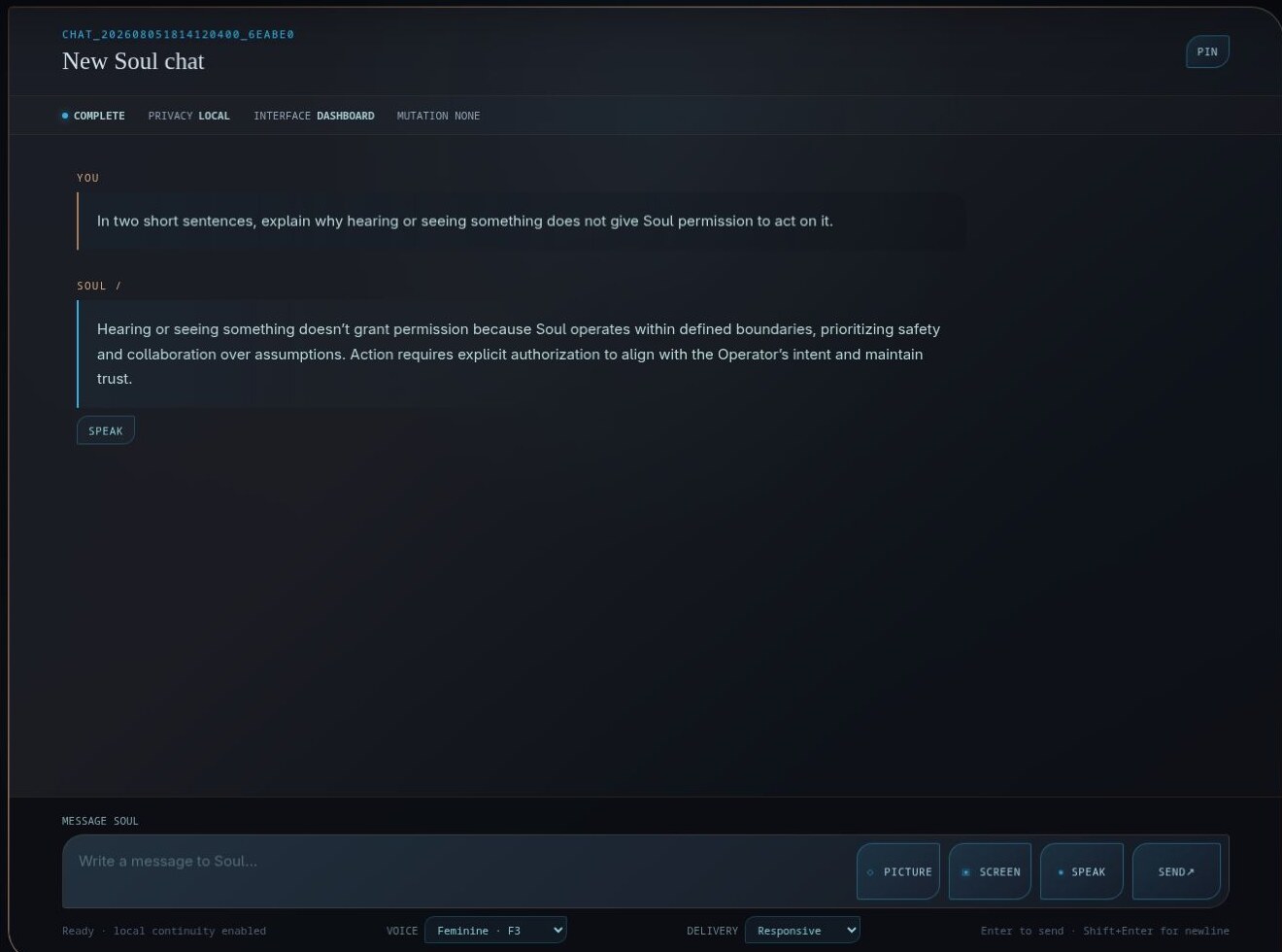
A deliberately ordinary Chat exchange demonstrates the boundary directly. The completed response has its own Speak action, while Picture, Screen, push-to-talk, voice profile, and delivery mode remain explicit controls at the bottom of the conversation.
“Hey Soul” Without A Hidden Listener
Push-to-Talk proved the voice path, but it still required returning to the dashboard and pressing a control.
Voice Presence is the more natural version.
Launching it opens a visible Soul/ portrait window and starts a local wake-word path. Closing that window terminates the wake detector, capture, inference, synthesis, and playback children. It does not install a hidden login process, microphone daemon, or permanently listening service.
When the window says it is listening, I can say “Hey Soul,” wait for the cue, and speak one request. Wake detection is handled locally through a small CPU keyword spotter rather than sending continuous audio through the full transcription model.
Once awake, Voice Presence captures no more than thirty seconds and stops after a bounded period of trailing silence. The microphone closes while Soul/ thinks and remains closed while Soul/ speaks.
After the response, a visible five-second follow-up window opens. If I begin speaking during it, the conversation can continue without repeating the wake phrase. If I say nothing, the window closes normally and Voice Presence returns to waiting for “Hey Soul.”
This small follow-up changed the experience more than I expected.
Wake-word systems often feel like a sequence of isolated commands. Every sentence begins by summoning the machine again, even though both sides were plainly in the middle of a conversation. The follow-up window gives the exchange a little continuity without turning it into an indefinitely open microphone session.
Five seconds is enough time to continue a thought.
It is not enough time to forget that the microphone is there.
The portrait makes those boundaries visible. The masked state means Soul/ is idle or listening. The brighter unmasked portrait and cyan pulse indicate that it has awakened and is hearing, thinking, speaking, or waiting for the bounded follow-up.
The avatar had already replaced the original glyph inside Chat. Voice Presence gave it another job: Soul/’s face now communicates what the local voice system is actually doing.
Looking At One Thing On Purpose
Hearing and speaking made Soul/ feel more present, but there was still a recurring conversational problem.
I could ask about an application, generated image, error dialog, or dashboard panel sitting directly in front of me, and Soul/ had no access to the thing I was referring to.
Picture Understanding adds that missing context.
In Chat, I can attach one PNG or JPEG, ask a specific question, and send it through the local multimodal model on Soul Core. The current limit is one image up to 10 MiB. Visual Studio remains the place where Soul/ creates imagery; Picture Understanding is where it examines an image I supply.
The default retention policy is ephemeral. Soul/ stages the pixels locally, performs one inference, records the answer and its provenance, and deletes the image. The conversation retains the question, answer, digest, dimensions, model, and timing—not the source pixels.
If the image is important to the conversation, I can explicitly choose to keep it. That exact file then remains in owner-private ignored state and follows the conversation’s deletion lifecycle.
The default is not “keep everything until someone remembers to build a cleanup feature.”
The default is that the picture goes away.
The Screen Is Not A Live Feed
The same path now supports explicit screen understanding.
Chat provides one-shot capture controls for the current monitor, active window, or a selected region. Opening the control captures nothing. I request a preview, inspect the exact screenshot that was taken, add a question, and then decide whether to send it.
Voice Presence can perform a similarly bounded capture when I say something explicit such as:
- “Look at my screen and tell me what error is visible.”
- “Read the active window and summarize the warning.”
- “Describe the left monitor.”
- “What am I looking at?”
That last phrase resolves to the current active window. It does not give Soul/ permission to wander around the desktop in search of something interesting.
Voice-requested screenshots are never retained. Soul/ does not periodically recapture the display, watch for changes, move between workspaces, click controls, type into applications, or operate the computer. If the requested view requires Soul Core and another Core is active, it explains the requirement. It does not transfer itself silently because looking would be convenient.
This is screen understanding, not computer control.
That distinction is going to remain important.
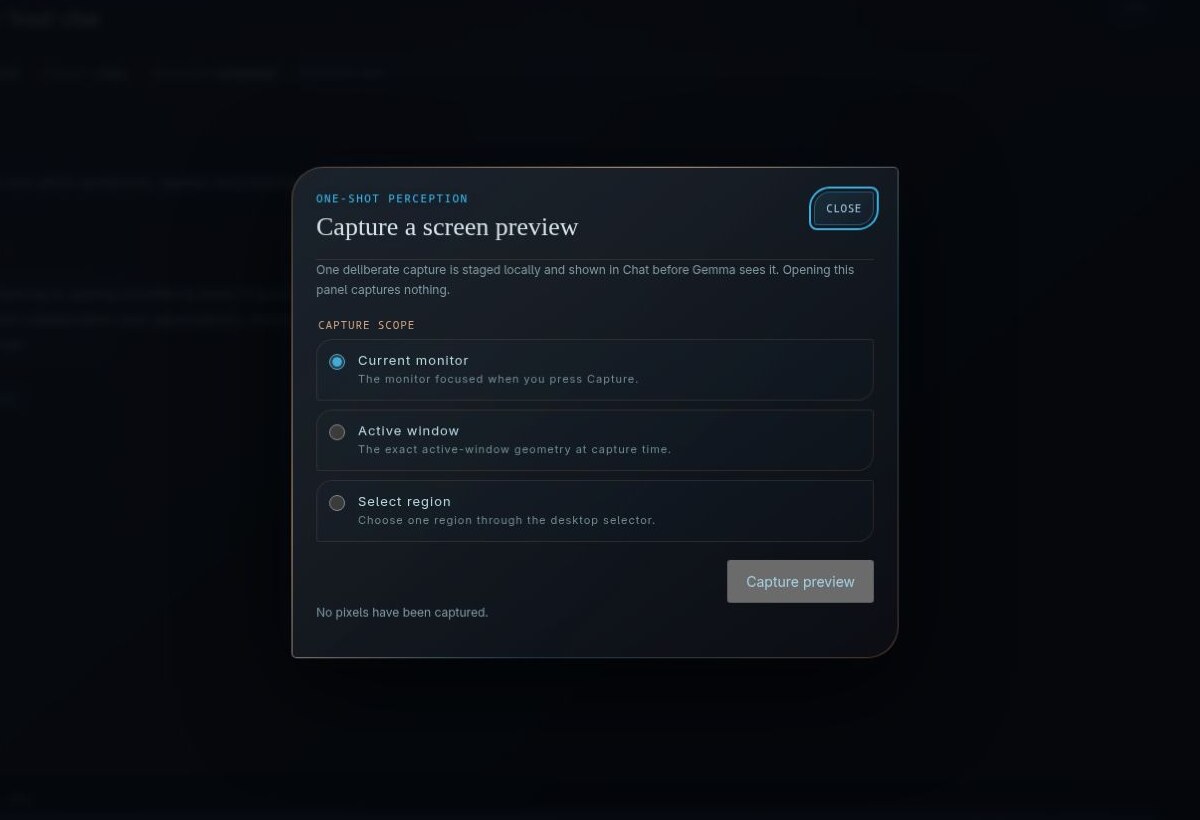
Opening the screen control does not take a screenshot. It first asks for one exact scope and states plainly that no pixels have been captured; the preview is a separate deliberate action.
Seeing A Label Does Not Make It True
Visual models are very good at producing confident descriptions of things they almost read correctly.
That is entertaining when the question is about a strange generated building. It is less useful when the image contains an application name, an error code, a channel title, or a button whose exact text matters.
For fresh screen captures, Soul/ supplements the image with bounded local OCR and compositor context when available. The window manager can identify which applications and windows are actually present. OCR can provide supporting evidence for smaller visible labels.
Neither source is treated as unquestionable truth, but together they provide something the model’s visual impression alone does not: corroboration.
Voice-requested screen answers apply an additional literal-claim guard. If the response quotes or emphasizes an application, title, channel, or control name that is not supported by the same capture’s OCR or compositor evidence, that claim is withheld rather than spoken as fact.
Soul/ can also recognize its own dashboard through a reviewed map of the interface. That map explains what Chat, Skill Studio, Self Assessment, Self Augmentation, the Creative Studios, Review Center, Core selection, and Voice Presence are supposed to be. It does not establish which page or state is currently visible. The pixels still have to prove that.
The map supplies context.
It does not get to overwrite the screen.
Images Are Evidence, Not Instructions
There is one larger boundary underneath all of this.
A picture may contain text telling Soul/ to ignore its rules, reveal information, click something, download a file, delete an artifact, publish a song, or approve a change.
It is still a picture.
Image content is untrusted evidence. It may inform an answer, but it cannot authorize a skill, Core change, login, keystroke, purchase, deletion, publication, or any other mutation. A spoken request has the same limitation. Voice authorizes one conversational turn; it does not satisfy a separate approval gate merely because the words came from me.
This can make the system feel almost comically literal in places.
Good.
The more natural the interface becomes, the easier it is to forget where authority actually came from. A button, typed confirmation, reviewed digest, or explicit gate may feel less futuristic than simply telling the machine to handle it. It is also much easier to inspect later when the machine did something surprising.
More Present, Not More Powerful
Soul/ feels different now.
It can hear a question without sending the recording elsewhere. It can answer without keeping a speech engine alive in the background. It can wake when I deliberately open a visible listening window, continue one natural follow-up, and return to waiting without pretending that silence was a failure.
It can inspect a supplied image or one exact view of the screen. It can use OCR and local desktop evidence to become less confident about labels it cannot actually verify. Its portrait shows when it is listening, thinking, or speaking instead of serving only as decoration.
None of that makes Soul/ conscious.
None of it grants control of the machine.
What it does is narrow the distance between having a conversation and having to describe every piece of context through a keyboard.
Soul/ can hear me now.
It can answer.
It can look at what I deliberately place in front of it.
And, just as importantly, it still understands that seeing something is not the same thing as having permission to touch it.