ARCHIVE SIGNAL General
How Soul/ Turns an Idea Into a Song
A closer look at how Soul/'s Core swapping, Music Studio, and Visual Studio turn a creative brief into reviewed audio, artwork, and a local video package.
Apparently The Chat Box Needed A Recording Studio
Soul/ started as a local conversational assistant.
It now has a Music Studio, a Visual Studio, several language models, three operating Cores, two GPU manufacturers, and a growing collection of songs that did not exist a few days ago.
This is approximately how these things happen around here.
The interesting part is not simply that a local model can produce audio or images. There are already plenty of interfaces where a prompt goes in, a file comes out, and the machinery between those events is treated as a minor spiritual mystery.
What I wanted was a workflow Soul/ could actually account for.
The creative brief should remain attached to the result. The model, seed, hardware, review, revision history, and final disposition should not disappear the moment a waveform appears. A song should not quietly become “approved” because generation completed without crashing. An image should not become the official artwork because it happened to be the newest PNG in a directory.
Most importantly, Soul/ should be able to do this work without giving up the conversation, taking permanent ownership of the larger GPU, or pretending that successful synthesis is the same thing as a finished production.
That is where Core swapping, Music Studio, and Visual Studio meet.
Three Cores, Two GPUs, One Increasingly Busy Machine
The machine running Soul/ has an AMD RX 6900 XT and an older NVIDIA GTX 1070.
The AMD card is substantially more capable. It is also the card used by the heavier creative models. If Soul/’s normal conversational model permanently occupies it, Music Studio and Visual Studio are left standing outside with clipboards.
Soul/ handles that through Cores.
A Core is not just a model-selection preset. It describes the operating posture of the machine: which model provides conversation, which provider serves it, which GPU owns that work, and which specialist resources are being preserved for something else.
The current arrangement is:
- Daily Core runs Gemma through Ollama and Vulkan on AMD. This is Soul/’s normal conversational home.
- AMD-Free Core moves conversation to Qwen through
llama.cppand CUDA on NVIDIA, leaving the AMD card available for other work. - Music Core also keeps Qwen on NVIDIA, but explicitly reserves the AMD lane for bounded ACE-Step music generation.
The language model changes, the inference provider changes, the GPU manufacturer changes, and the age of the hardware changes by several years. Soul/ is still expected to remain Soul/.
That works because the model is not where Soul/’s identity lives. Conversation history, memory, personality rules, tool contracts, project state, approval boundaries, and evidence remain outside the model. Gemma and Qwen provide different brains for the current exchange; neither one owns the assistant.
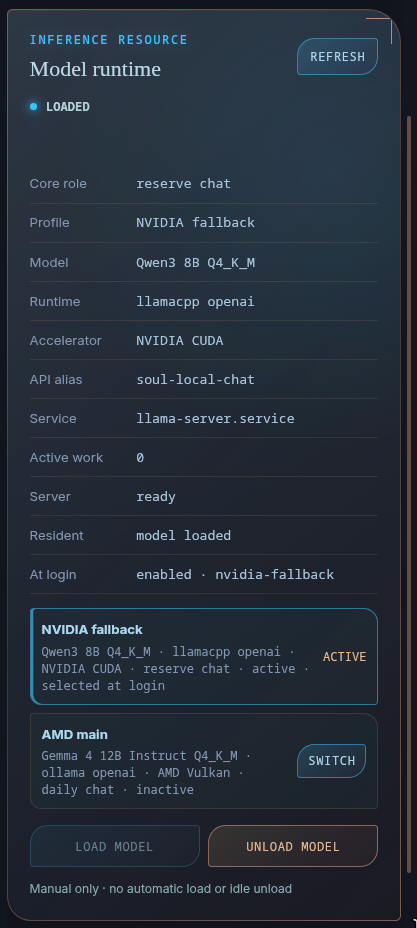
The runtime selector shows the separation directly. Conversation can remain active on NVIDIA while the AMD card is reserved for creative work.
Core changes are explicit operations. Soul/ previews the exact transition, checks whether either resource has active work, revalidates the resource lease, and waits for approval bound to that preview.
It will not unload a working model because another task looks more interesting. It will not interrupt a render to make room for music. It will not quietly fail over and inform me afterward that the machine has developed a new operating philosophy.
If Qwen is already active and idle, moving between AMD-Free Core and Music Core does not require restarting it merely to change the recorded intent. If the AMD card is occupied, the creative operation stops at the resource gate. Returning to Daily Core is also deliberate; there is no unattended timer waiting to rearrange the machine when I look away.
This is the connective tissue beneath both Studios. The creative tools do not merely know which model file to call. They understand which part of the machine is available, why it is available, and whether the requested work is allowed to claim it.
What Music Studio Actually Needs
A Music Studio project can begin in the dashboard or through an explicit request in Chat.
Soul/ does not interpret every mention of music as an instruction to compose something. “I have been listening to industrial music” remains a conversation. “Create an industrial instrumental” begins a workflow.
Four decisions belong to me and cannot be silently invented:
- Intent: what the piece should communicate or accomplish.
- Duration: one of the supported exact presets—30 seconds, 90 seconds, 3 minutes, or 10 minutes.
- Mode: instrumental or vocal.
- Rights status: original, licensed, or public-domain material.
The rest can be supplied directly or drafted by Soul/ for review:
- Title.
- BPM.
- Key and meter.
- Reproducible seed.
- Sound and structure.
- Lyrics with section markers when the project is vocal.
The Sound and Structure block is deliberately limited to 512 characters. It works best as one coherent musical identity: genre, principal instruments, texture, mood, and broad progression.
It is not a place to request seventeen genres, six incompatible production eras, three unrelated emotional arcs, and a tasteful amount of restraint.
That way lies prompt soup.
Soul/ can ask only for the missing required decisions, draft the optional material, and show the complete brief before anything reaches the music runtime. Every field remains visible and editable. Model-generated input is still input, not approval.
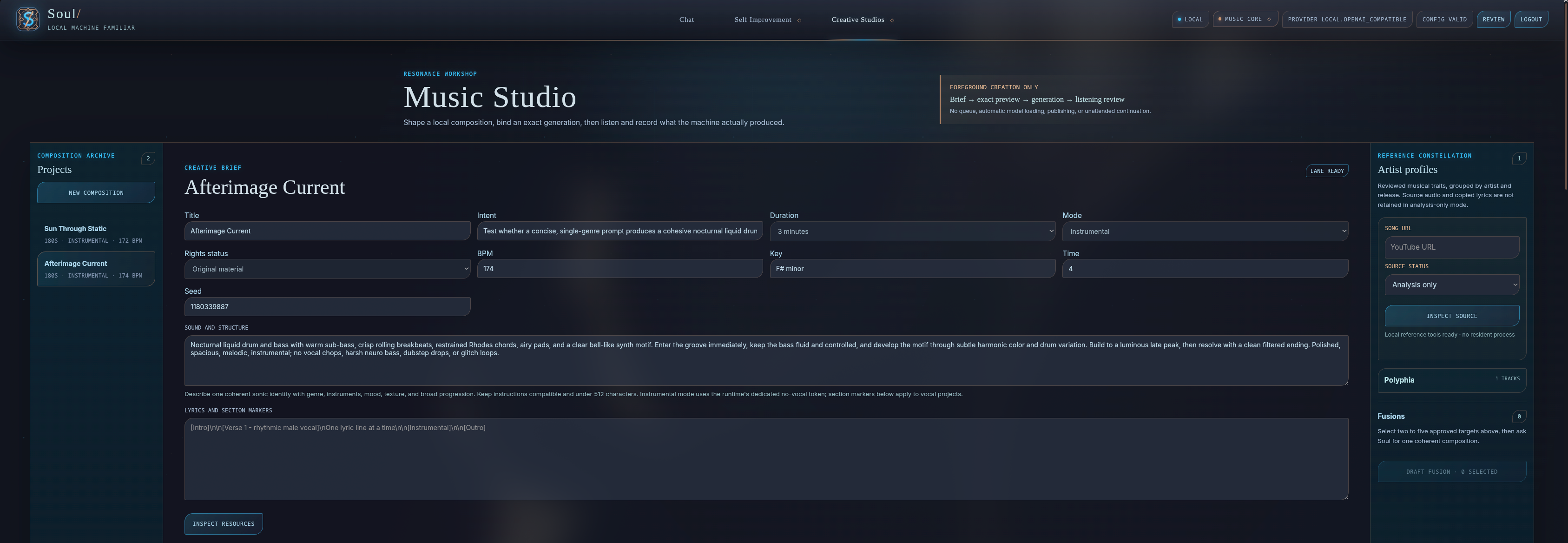
Music Studio keeps the creative brief, exact generation inputs, candidates, references, and reviews inside one private project rather than scattering them across a prompt history and an output folder.
From Brief To Candidate
Once the brief looks right, the workflow becomes intentionally mechanical:
- Soul/ inspects the available Core, GPU, and model profile.
- It prepares an exact generation preview containing the project input, candidate ID, model profile, resource scope, seed, and digest.
- I authorize that candidate—not “music generation” as a general future privilege.
- Conversation moves to the NVIDIA reserve when the required Core transition is part of the approved action.
- ACE-Step loads on AMD for one bounded foreground generation.
- The runtime validates the result, writes a 48 kHz stereo FLAC master and an MP3 listening copy, then exits.
- The candidate returns to human review.
The job belongs to Soul/, not to the browser tab. I can move elsewhere in the dashboard and return without killing the generation. The project reconnects to the durable job record and shows its current state. Cancellation remains a separate action bound to the active candidate and reaches the underlying process rather than merely hiding a progress indicator.
Soul/ also checks the audio-code plan before treating synthesis as successful. Earlier experiments proved that a backend can create a file and report success after the numerical work has already collapsed into nonsense.
A file existing is strong evidence that a file exists.
It is not proof that music happened.
When Soul/ detects severe repetitive collapse, the same approved operation may retry with a deterministic derived seed. The retry count is bounded. If the plan keeps collapsing, the workflow stops for review instead of generating forever until probability accidentally produces something survivable.
First Draft Does Not Mean Unreviewed
Every completed candidate has an audio player, lossless master, timing information, immutable inputs, and lineage back to the project that created it.
The review covers:
- Musical quality.
- Prompt adherence.
- Vocal and lyric adherence when applicable.
- A rating and written observations.
- A disposition of keep, revise, or reject.
Keeping a candidate unlocks later export and companion paths. Revising preserves the source and prepares a new linked candidate. Rejecting still requires a separately previewed deletion; a bad rating does not authorize Soul/ to erase evidence.
For vocal work, an optional CPU transcription pass can compare the intended lyrics with what the machine appears to have produced. That result is explicitly machine-heard evidence. It can identify likely problem lines and support a revision, but it cannot approve the song.
The conversational model does not claim to have ears. Human listening, deterministic analysis, and model interpretation remain different kinds of evidence.
Soul/ can translate my recorded review into a proposed revision—updated sound and structure, BPM, key, meter, seed, and rationale—but the revision remains editable and requires a new exact generation action.
There is a fairly elaborate revision system here.
I have mostly used it to confirm that I liked the first candidate.
The tracks currently published through Soul Slash Synthesis are primarily first-draft versions in that practical sense. I did review the work. Some briefs, visual decisions, and surrounding material changed along the way. For the YouTube releases, however, I largely kept the original musical candidate rather than polishing it through a long production chain.
That includes:
- This Thought Is Not Your Own, which leans into a more invasive, fractured machine-consciousness atmosphere.
- The Void Learned Hunger, a darker and more spacious result that sounds exactly as friendly as the title suggests.
- Compiler Bloom, which may be the most concise summary of the project’s current techno-sorcery problem.
These are not being presented as painstakingly mixed final masters or proof that one prompt has replaced a studio full of musicians. They are closer to field recordings from the system: an approved brief, one bounded generation, a human keep decision, and the machine marks left mostly where they landed.
All of the current Soul Slash Synthesis tracks are also available in the music player on the NOC Thoughts main page. Loop remains optional, because apparently even a machine familiar can overstay its welcome.
Then The Song Needs A Face
A kept music candidate can exist perfectly well on its own.
YouTube is somewhat less enthusiastic about uploading a FLAC file into the void.
Visual Studio provides the next part of the workflow. It is a separate private project system with its own briefs, candidates, revisions, review records, and resource gates.
The visual project records:
- Title: the project label.
- Intent: what the visual should communicate and where it will be used.
- Frame: landscape 16:9, square 1:1, or portrait 9:16.
- Seed: the reproducibility input.
- Scene and aesthetic: subject, environment, composition, lighting, mood, palette, and material language.
- Exclude: text, watermarks, malformed structures, unwanted styles, or anything else that should not appear.
When Visual Studio is invoked through Chat, the only required creative input is a clear intent. Soul/ may draft the title, prompt, exclusions, frame, and seed, then place the full brief in front of me before generation.
Again, it may draft. It may not decide.
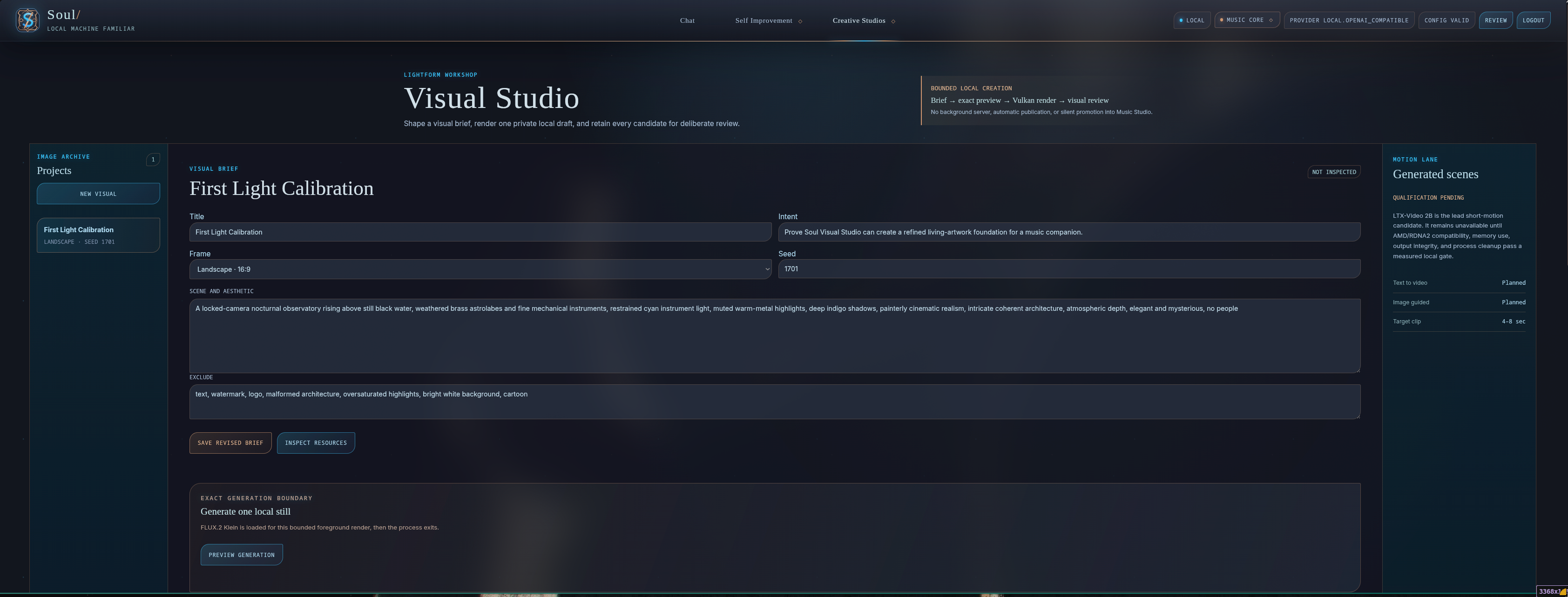
Visual Studio uses the same basic contract as Music Studio: visible input, exact resource inspection, one bounded generation, immutable output, and human review.
The still-image lane uses a local FLUX.2 Klein model through Vulkan on AMD. Visual Studio can also perform image-guided revisions without overwriting the source candidate.
The motion side now has two real lanes:
- Image-guided motion begins with a kept still and uses Wan 2.2 to create a short motion study.
- Native text-to-video uses a distilled FastWan 2.2 profile for a four-, eight-, or twelve-second scene at a delivered 24 fps.
These are short generated studies, not several minutes of unique synthetic film. When a motion candidate is eventually used for a full song, Soul/ repeats the exact accepted clip and muxes it with the exact accepted audio. The project describes that honestly rather than claiming the model generated a continuous three-minute cinematic sequence.
The same resource rules apply. The creative model loads for one approved foreground render and exits afterward. There is no resident image server, no permanent motion worker, and no automatic visual generation because a song reached keep.
Revision Without Quietly Replacing The Past
Visual candidates receive a rating, notes, and a keep-or-revise disposition.
An image-guided revision starts from one exact candidate. The request describes what should change and, just as importantly, what must remain invariant. The new candidate retains a link to its source. The old image remains exactly where it was.
Native scenes work the same way. Review notes can be turned into the next scene direction, but the revised clip receives a new seed, exact preview, immutable input, and separate result.
Soul/ does not claim to see the image through the conversational model when it has only been given project metadata and human notes. It can reason over the evidence available to it and prepare a bounded edit. The actual pixels remain the Visual Studio runtime’s responsibility.
That separation is slightly less magical.
It is considerably more useful when something goes wrong.
Binding The Exact Song To The Exact Image
Once both candidates have recorded keep reviews, Visual Studio can bind one exact visual to one exact Music Studio candidate.
The binding is another previewed operation. It copies the reviewed visual into the music candidate’s lineage and records where it came from. It does not search for the most recent image, guess which project title I meant, or silently promote an unreviewed candidate because it has an attractive thumbnail.
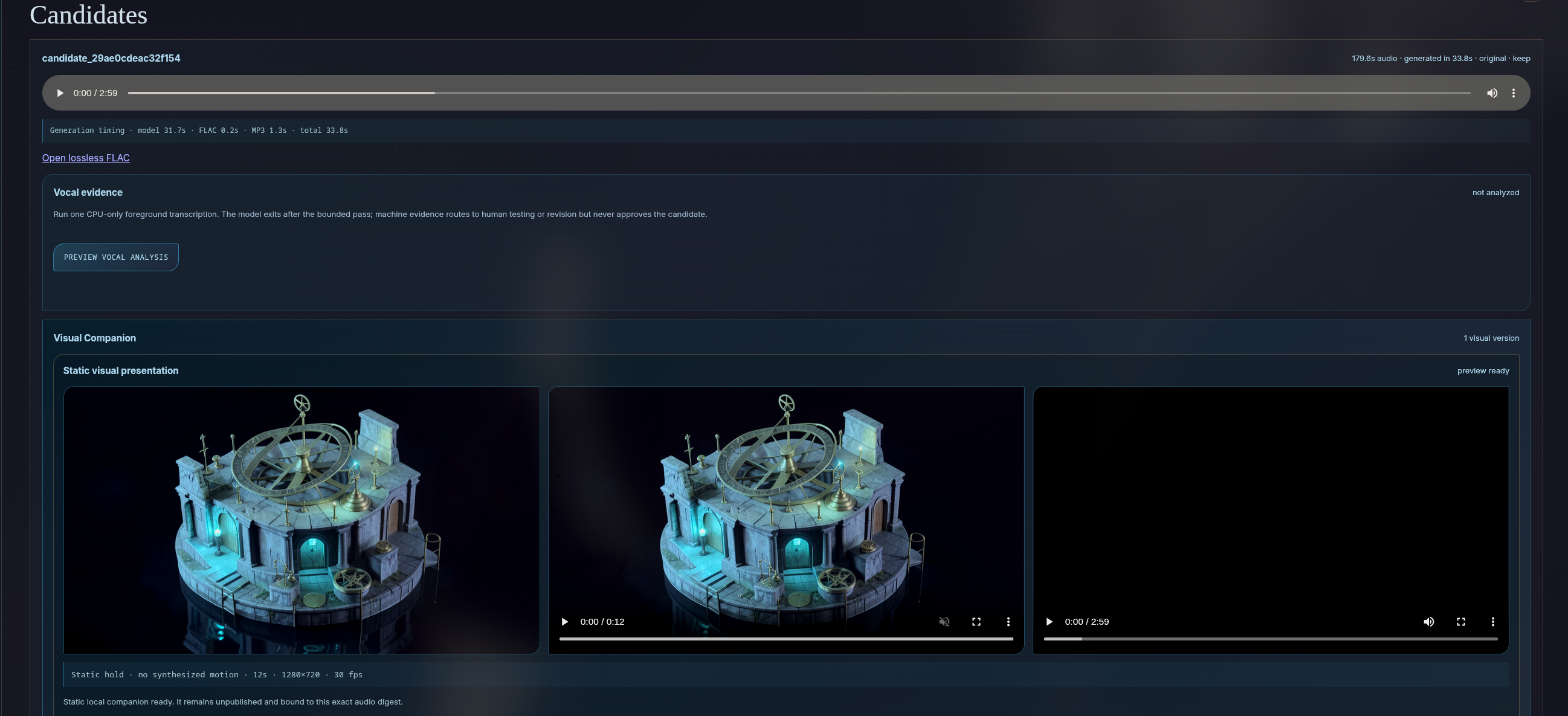
The companion lives with the music candidate’s evidence. Audio, visual, review, and lineage remain connected all the way to the export path.
From there, Music Studio can:
- Choose the framing, matte treatment, and fades.
- Render a static presentation or repeat an accepted short-motion study.
- Mux the exact reviewed audio with the exact reviewed visual.
- Produce a local MP4, thumbnail, editable description, and private-upload metadata.
The result is a deterministic local YouTube package.
Soul/ does not upload it.
Publication remains outside the assistant because a generated package—even a reviewed one—is not permission to represent me publicly. I still inspect the final files, choose the metadata and visibility, and perform the upload.
The last mile is intentionally human.
The Whole Path
In its shortest form, the creative workflow now looks like this:
idea
→ required music decisions
→ editable Soul-drafted brief
→ exact generation preview
→ approved Core transition
→ bounded AMD music generation
→ FLAC + MP3 candidate
→ human keep/revise/reject review
→ visual intent and editable brief
→ bounded still or short-motion generation
→ human visual review
→ exact companion binding
→ deterministic local video package
→ human publication
→ NOC Thoughts music player
Every arrow represents a boundary Soul/ can explain.
Some are automated transformations. Some are resource transitions. Some are human decisions. None of them are supposed to become interchangeable merely because the dashboard can make the whole sequence look smooth.
That distinction is the actual feature.
Music Studio makes audio. Visual Studio gives it a visual identity. Core swapping allows both to use the strongest hardware without evicting Soul/ from the conversation. The review and lineage systems keep each output connected to the decisions that produced it.
The songs are useful demonstrations, but they are also diagnostics. They reveal where prompts are too crowded, where models collapse, where visual motion remains unstable, where a first candidate is unexpectedly good, and where the entire production path contains one more approval gate than I remembered adding.
For now, I am intentionally leaving most of these releases close to their first generated form.
There will be time to make them cleaner.
At this stage, I am more interested in hearing what the machine says before I teach it how to hide the accent.